
Community
How to join the ranking and see your position
Join the ranking, choose which boards to appear on and compare your consistency, strength and volume with friends, gym and region.
- Plan
- Athlete
- Coach
- Works on
- iPhone
- Android
The ranking compares your consistency with other people's. Consistency is the main score: points for each workout up to your weekly goal, plus a bonus when you meet it. Strength and volume count relative to your body weight, so people of different sizes compete on equal terms. Nobody appears in the ranking without asking to.
Before you start
- The ranking is for people 18 or older. In the teen mode (16 and 17), the ranking, league, teams, friends and duels are closed. See Teen mode: how Gym+ works at 16 and 17.
- Sign in to your account to see the boards.
Step by step
Open the Profile tab and, under My training and progress, tap Ranking. The screen opens on the Ranking tab, next to League and Visits.
Tap Join. In Ranking settings, confirm I am 18 or older and turn on the boards you want to appear on: Friends board, My gym's board or City, state and country boards.
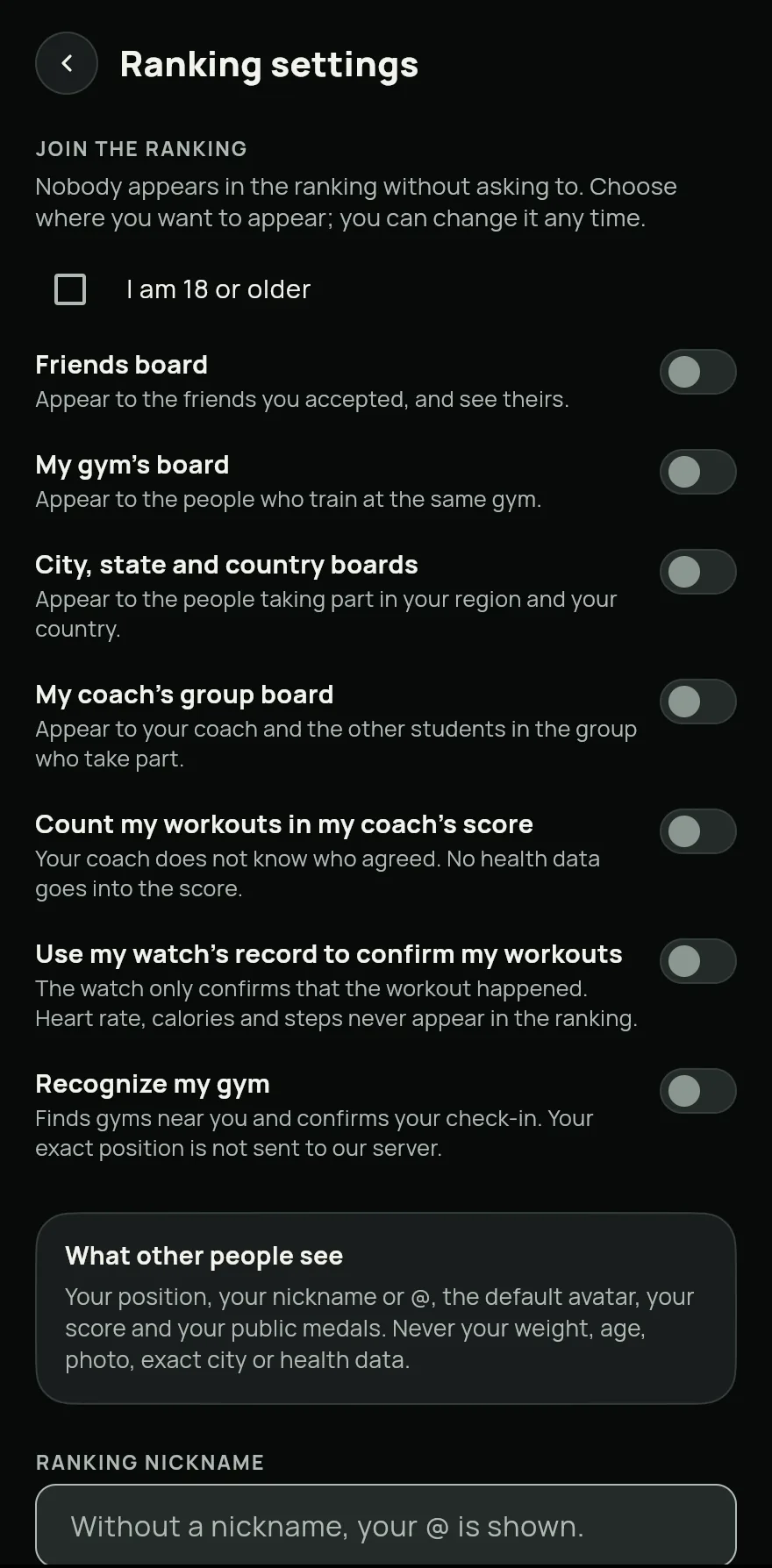
Step 2 Still in settings, choose a Ranking nickname (without one, your @ is shown), your Division and your Weekly goal. For the strength and volume boards, tap Confirm weight.
Back on the ranking, pick the board with the buttons at the top, such as Friends, Gym, City, State or Country.
Pick what to compare: Consistency, Hard sets, Relative volume or Strength. The Your position card shows where you stand.
Tap How the ranking works to see the rules of each score and what is public.
Common problems
- The board says there are not enough people
- Boards with fewer than 10 people are not shown, so nobody is exposed. Tap Invite to bring your friends. On the friends board, two friends are enough.
- I am not on the strength and volume boards
- Confirm your weight in Ranking settings. For strength, only records confirmed by your watch or by your coach count.
- One of my workouts is under review
- Workouts whose numbers we cannot confirm stay off the board until a review, and your history does not change. In Ranking settings, tap Appeal to ask for a new look.
- I cannot find Ranking in Profile
- The ranking stays hidden while Medals, levels and competitions is off. Turn it on again in Settings, in the Workout group.
Open in the app
In Gym+, tap the question mark on the Home screen to open the Help Center and search for “Ranking”. The Open now button takes you straight to the screen.
Related articles
- How to earn and see your medalsSee the medals you have earned and how far you are from the next ones, for consistency, volume, records and gym visits.
- How to log your gym visitsCheck in at the gym with a selfie taken on the spot, follow your streak and choose who sees your photos.
- How the league and its divisions workJoin the league, compete for the season in a drawn group of your division and climb from Bronze to Master by training.
Updated on 10/26/2026, app version 1.3.6