
Getting started
Today's card: which workout Gym+ suggests
How today's card picks between your plan's routine and your most rested muscles, and what to do with each suggestion.
- Plan
- Athlete
- Coach
- Works on
- iPhone
- Android
Today's card sits at the top of the Home screen. It suggests the routine your plan sets for the day or, with no routine planned, the focus that suits your most rested muscles. Beside it, the body map shows how each muscle is recovering.
Step by step
Open the Home screen. With a routine planned for today, the card shows Today's routine with its name. With no routine planned, it shows Today's focus, such as Push day or Leg day.
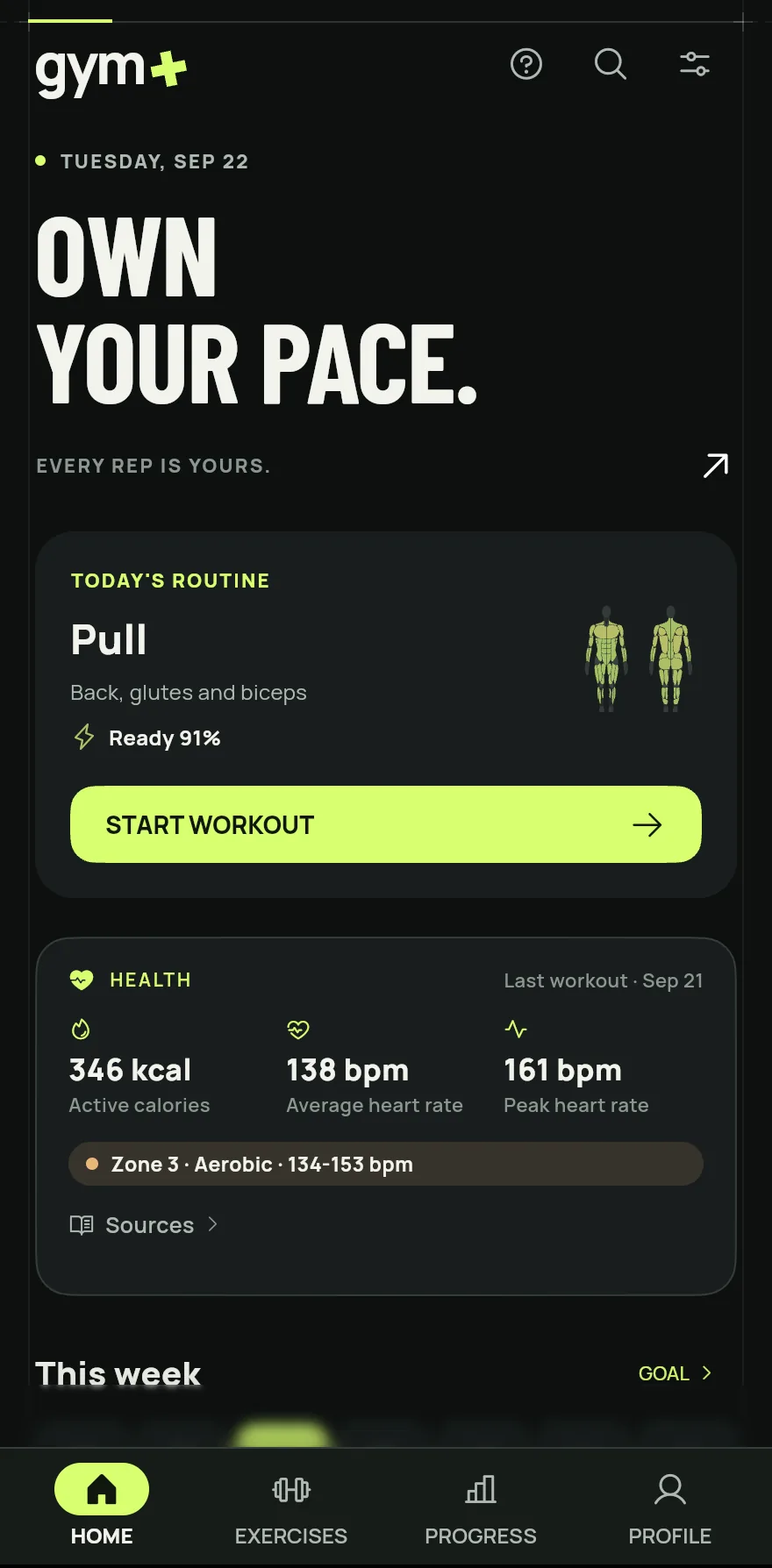
Step 1 Under the title is Ready, as a percentage: how far the muscles of the suggested workout have recovered.
Tap Start workout to open the ways to start. Tapping anywhere on the card does the same.
If a muscle of the routine is still recovering, the card warns you and may offer Switch to another routine of your plan. To keep the routine of the day, tap Train anyway.
With no routine planned, the card also offers the Quick workout, built on the spot with the time you have.
After the workout, the card shows Done today. If you want to train more, tap Train again.
Common problems
- Today's card is gone and only the Start workout button shows
- The suggestion can be turned off. Open the Profile tab, tap Settings and, under Workout, turn on Today's focus.
- The card does not suggest the routine I expected
- Check that the routine is planned for today on the Routines screen. See How to create and use workout routines.
- I follow a coach's program and my card moved down
- With a coach's program in force, the coach's workout comes first and your card shows right below it.
Open in the app
In Gym+, tap the question mark on the Home screen to open the Help Center and search for “Today's workout”. The Open now button takes you straight to the screen.
Related articles
- The Home screen: what each part showsWhat the Gym+ Home screen shows, from today's workout to your week, and where help, search and settings are.
- Muscle recovery: how to read your readinessHow Gym+ works out the recovery of each muscle from your sets and where to see the body's recovery map.
- How to set your weekly goal and follow your rhythmSet how many days a week you want to train, watch your week fill up on the Home screen and compare your last weeks.
Updated on 10/26/2026, app version 1.3.6